Client:
BYU Library
Project Duration:
Ongoing
Project Overview
The purpose of this project is to evaluate the current method used for students to reserve study rooms in order to decide what updates need to be made as the library considers switching to a different reservation system. Along with the online reservation system, this project is meant to measure the effectiveness of digital reservation screens currently outside every study room. This project is currently ongoing, meaning that there are no final results yet.
Research Journey
User Journey
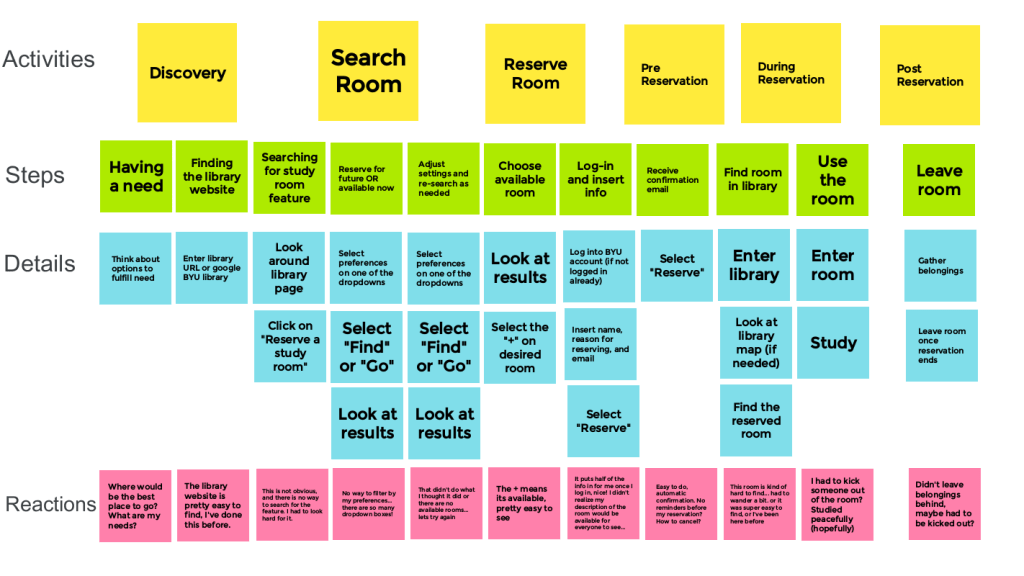
I developed a simple user journey map to show the mechanics of how a user currently reserves a study room, as well as the reactions a user might potentially feel.
I developed the following interview questions to gather qualitative data on both the usability and aesthetic of the current scheduling system:
- How often do you use room scheduler?
- Do you use it for groups or individually?
- How often do you use a room someone else scheduled?
- On what device do you usually schedule rooms?
- What do you like about the room scheduler?
- What do you not like about the room scheduler/what could be improved?
- What features do you like to see in scheduler applications?
- What is your preferred approach for searching available rooms? (eg. By location, time, capacity, amenities, etc?)
- How and when do you want notifications about the rooms?
- What qualities would help you use the scheduler?
- How often do you use the signs on the front of each room? How do you like to use them?
- What qualities or features would make you like the scheduler better? Final thoughts/comments
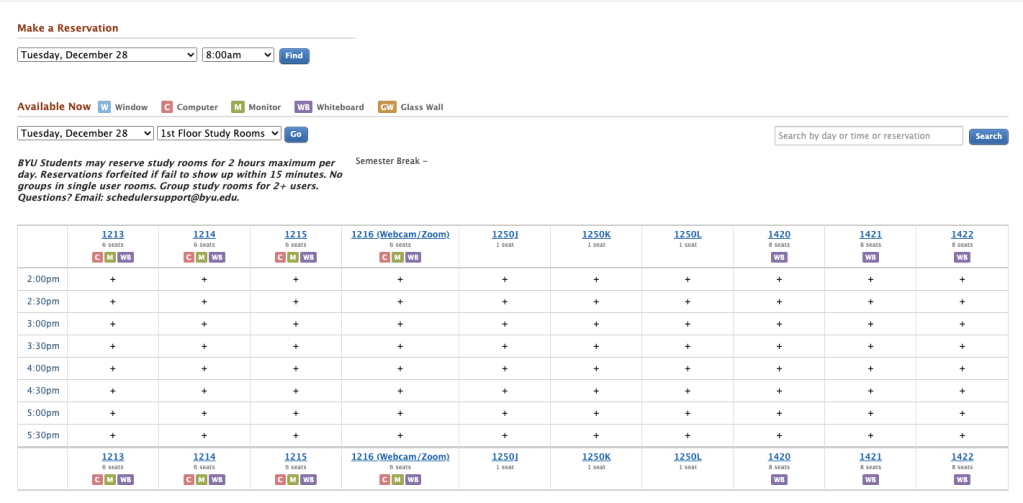
- To ask more specific questions about the current system, I have users go to the current website, share their screen with me, and answer the following questions:
- How do you feel about the size of the fonts used?
- The colors? How would you feel about the incorporation of icons in the page?
- How do you feel about the navigation of the page?
- What actions do you see that can be completed?
- What would help you navigate this page easier?
Interview Findings
- Desired Features
- Color coordination would be nice to visually see what is available and what is not at a glance
- Being able to filter rooms by group size
- Request to join other groups that are reserved? (ie, see that there is a chem 357 study group reserving a room, request to join their group?)
- Including pictures of rooms
- Option for a calendar view to see when certain rooms are available
- Having your account remember your preferences (ie, would you like to schedule this room again? Here are rooms similar to what you scheduled previously. Having another BIO 100 study session? etc)
- Tutorials/how to use scheduler
- Give map to room with confirmation email, many people have a very hard time finding the room they have scheduled
- Step by step reservation, (ie first day, then hour, then amenities, then search)
- Having an option to automatically add reservation to your calendar
- Knowledge of what media access or book subjects are nearby
- Miscellaneous Feedback
- Some way to check in once you have the room? Having to put in a pin or something at the screen by the door so that if they don’t come to their reservation it can be given to other students
- Notifications: Most prefer email, occasionally some prefer text message for notifications. Most common is to want a confirmation when booking, a reminder 24 hours before/day of, and 30 minutes before.
- Most people don’t care as much about the specific room or location so much as availability and sometimes amenities (specifically whiteboards), the only time people cared more about the room type is when saying their preference is the newer more modern rooms.
- So far in interviews no one has ever used the digital signs in front of the study rooms, only one person knew what they were. (Do we have data, are people making reservations on the screen? Is there a flag in the reservation or log, to track usage of screens to reserve?)
- Deterrents to Using the System
- Not having a group to study with
- Not knowing reserving rooms was possible
- Not being able to find available rooms
- Not convenient to figure out how to reserve
Project Results
This project is ongoing. Based on my research so far, we are adding analytics to the scheduling screens and the scheduling website in order to get more data on current usage. Once we have more information, we will continue to move forward with the potential re-design.
 Madelyn Russell